Remote Access
SSH Protocol Overview
SSH (Secure Shell) provides secure remote access to Port systems for administration and monitoring.
SSH Client Setup
PuTTY Installation
PuTTY is a free, open-source terminal emulator supporting SSH, Telnet, and other network protocols.
!!! tip "Download PuTTY" Download PuTTY Application
SSH Connection Process
1. Connection Configuration
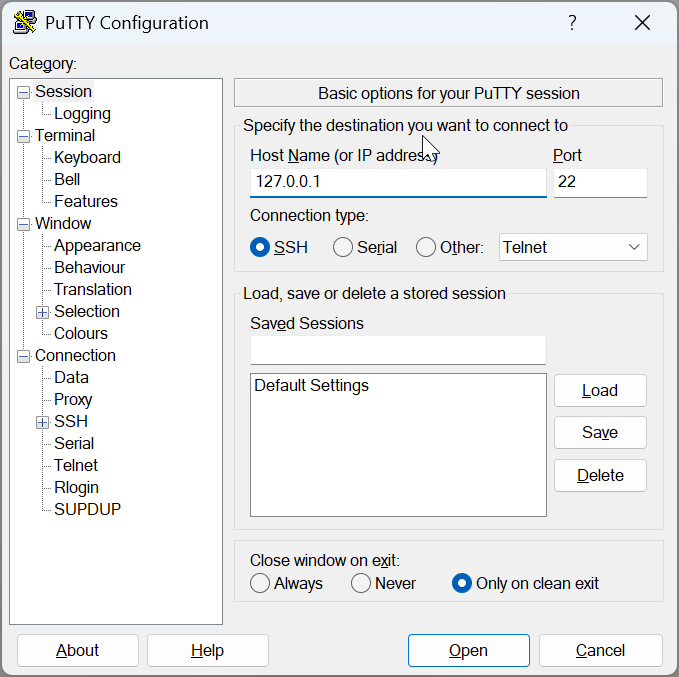
Connection Details:
- Host:
127.0.0.1 - Port:
22 - Protocol: SSH
!!! note "Default Credentials"
- Username: admin
- Password: admin
2. Authentication

Enter your credentials when prompted to establish the secure connection.
3. Command Execution
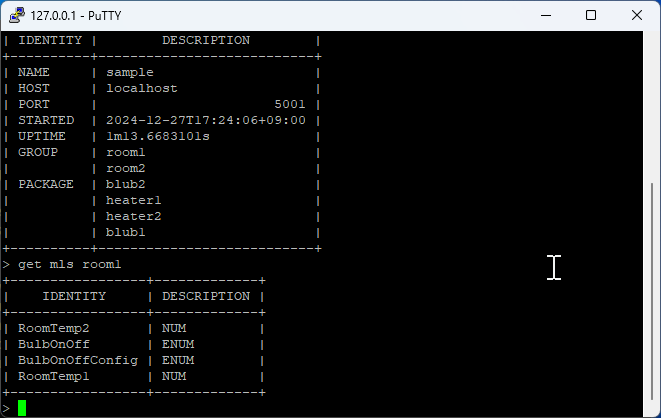
Once connected, you can execute various Port commands remotely:
- View system status
- Access log files
- Monitor project operations
- Perform administrative tasks
Remote Command Examples
Basic System Commands
# Check server status
status

# Get server uptime
uptime

# Measure network latency
latency
Data Access Commands
# Get data from server
get Equipment Status
get SECS Temperature
get MyProject.log

# Set data on server
set Equipment Status RUNNING
set SECS CommState ENABLED
set Process Temperature 150.5
Log Access Commands
# Access project logs
get sample.log
get MyProject.log

# Access package logs
get SECS.log
get GEM.log

# Access system events
get SECS.event
get GEM.event
Administrative Commands
# User management
set password admin oldpass newpass123
set grant operator 2

# System notifications
set notify "Process completed successfully"

# Package operations
set init SECS
set init GEM
SSH Security Best Practices
Connection Security
- Change Default Credentials: Always change default username/password
- Use Strong Passwords: Implement complex password policies
- Enable Key-based Authentication: Use SSH keys instead of passwords when possible
- Limit Access: Restrict SSH access to authorized users only
Network Security
- Firewall Configuration: Configure firewall rules for SSH access
- Port Configuration: Consider changing default SSH port (22)
- IP Whitelisting: Restrict access to specific IP addresses
- VPN Integration: Use VPN for additional security layer
Session Management
- Session Timeout: Configure automatic session timeout
- Connection Monitoring: Monitor active SSH connections
- Audit Logging: Enable comprehensive SSH audit logging
- Failed Login Protection: Implement failed login attempt protection
Troubleshooting SSH Connections
Common Connection Issues
Connection Refused
# Check if SSH service is running
get status

# Verify port configuration
get config ssh_port
Authentication Failures
# Verify user credentials
get user admin

# Check authentication logs
get auth.log
Network Connectivity
# Test network connectivity
ping 127.0.0.1

# Check firewall status
get firewall status
Error Resolution
| Error | Cause | Solution |
|---|---|---|
| Connection timeout | Network/firewall issue | Check network connectivity and firewall rules |
| Authentication failed | Wrong credentials | Verify username/password |
| Permission denied | User access restrictions | Check user permissions and access rights |
| Host key verification failed | SSH key mismatch | Update or remove old host keys |
Advanced SSH Features
SSH Tunneling
Create secure tunnels for accessing internal services:
# Local port forwarding
ssh -L 8080:localhost:5001 admin@127.0.0.1

# Remote port forwarding
ssh -R 9090:localhost:5001 admin@127.0.0.1
SSH File Transfer
Transfer files securely using SSH protocols:
# Using SCP (Secure Copy)
scp file.txt admin@127.0.0.1:/remote/path/

# Using SFTP (SSH File Transfer Protocol)
sftp admin@127.0.0.1
SSH Key Management
Generate and manage SSH keys for enhanced security:
# Generate SSH key pair
ssh-keygen -t rsa -b 4096

# Copy public key to server
ssh-copy-id admin@127.0.0.1
Integration with Port Applications
Remote Monitoring
Monitor Port applications remotely through SSH:
# Monitor system resources
get system resources

# Check application health
get health status

# View real-time logs
get logs --follow
Remote Configuration
Configure Port applications remotely:
# Update configuration
set config parameter value

# Restart services
set service restart

# Deploy updates
set deploy package_name
Remote Debugging
Debug Port applications remotely:
# Enable debug mode
set debug enabled

# View debug logs
get debug.log

# Set breakpoints
set breakpoint function_name